

Request for Payment (RfP) Transaction
Instant Pay In (RTP / Request for Payment)
Instant Pay In lets you collect funds from your users in real time using Request for Payment (RFP) over the RTP network, instead of waiting for ACH settlement.
If the user’s bank supports RFP:
- Aeropay sends a payment request to the user’s banking app.
- The user approves the request.
- Funds move instantly to Aeropay.
- Aeropay then pays out your merchant account via RTP.
If RFP is not available for the user’s bank, we automatically fall back to ACH.
RequirementTo use Request for Payment, your merchant operating bank account must be enrolled in the RTP network. Contact your Aeropay representative to confirm eligibility.
Recommended Approach
Request for Payment (RFP) is an optional payment experience that merchants can offer alongside standard ACH. As a newer payment rail, RFP introduces meaningful tradeoffs between risk reduction, settlement speed, and user conversion.
RFP provides several advantages. Transactions are authorized directly through the user's bank and settle within seconds, substantially reducing overdraft and dispute risk while providing merchants access to funds much faster than the traditional ACH batching and settlement process.
The tradeoff is additional user interaction. To approve an RFP, the user must leave the merchant experience, authenticate with their online bank (typically via a native app), and complete the bank's approval flow. Experiences vary by financial institution, while standard ACH may provide better conversion for users who prefer a more streamlined checkout.
Merchants should consider their own risk and conversion appetite when determining how to offer RFP. Depending on the use case, merchants may choose to:
- Default to RFP whenever it is available.
- Use RFP selectively for transactions that present greater ACH risk. For example, when a user's available balance is only slightly greater than the transaction amount and the ACH transaction has otherwise been rejected (see AP307 error).
- Offer both RFP and standard ACH and allow the user to choose. This can drive instant vs. delayed access to funds.
There is no single recommended approach. RFP can be particularly valuable when the certainty of bank-authorized, instant settlement outweighs the additional steps required from the user.
How it works
How it works
- Step 1 – Authenticate using
POST /v2/tokento get a JWT (30-minute TTL). - Step 2 – You create a transaction via
POST /v2/transactionwithrtp=true. - Step 3 – If RfP eligible (feature flags, routing number, KYC/PII, provider status), Aeropay:
- Creates a transaction.
- Sends an RFP to the user’s bank. The RFP has a 15 minute expiration window.
- Returns
200 OKwith atransactionobject andtransaction.isRtp=true(RTP rails) when applicable.
- Step 3 – If not RfP eligible, Aeropay:
- No RfP is initiated. Transaction falls back to ACH.
- Step 4 – You listen for webhooks:
transaction_rfp_deliveredwhen the RFP reaches the user’s bank.transaction_completedwhen the user approves and funds clear.transaction_rfp_rejectedortransaction_rfp_expiredif the user declines or does nothing.
- Step 5 – (Not always applicable) Aeropay pays you out via RTP, and you receive:
payout_rtp_initiatedpayout_rtp_processed(orpayout_rtp_failed)
Webhooks may arrive slightly out of order, so always use the latest event for a given transactionId or payoutId.
PII Requirement
When creating an Instant Pay In transaction (rtp=true), the userIdentification object is required. It provides the PII needed for RFP eligibility verification with the user's bank.
You must include one of the following options:
{
  "userIdentification": {
    "birthday": {
      "date": "1962-11-05", // Required. Date of birth in ISO 8601 format (`YYYY-MM-DD`)
      "country": "US", // Required. Country of birth. Two-letter country code (ISO 3166-1 alpha-2)
      "city": "Chicago" // Optional. City of birth.
    }
  }
}
OR
{
  "userIdentification": {
    "address": {
      "streetName": "123 Main St", // Required. Street address including number
      "city": "Chicago", // Required. City name
      "state": "IL", // Required. Two-letter state abbreviation
      "postalCode": "60601", // Required. ZIP or postal code
      "country": "US" // Required. Two-letter country code (ISO 3166-1 alpha-2)
    }
  }
}
Rules and Guidance
- Required only for Instant Pay In -- If
rtpis omitted orfalse,userIdentificationis not needed. - Provide one option -- Either
addressorbirthday. If both are provided, Aeropay may use either for eligibility checks. - Reuse existing KYC data -- If you already collect this information during onboarding or KYC, pass it here without re-prompting the user.
- PII is never returned --
userIdentificationdata does not appear in transaction responses or webhook payloads. - Treat as sensitive -- Do not log or persist these fields in your own systems beyond what is required for compliance.
1. Creating an Instant Pay In transaction
Instant Pay In uses the existing Aeropay v2 transaction endpoint, plus an additional rtp flag.
Get a token (JWT)
Tokens last for 30 minutes and must be sent as Authorization: Bearer {{token}}.
Merchant-scoped token
POST /v2/token HTTP/1.1
Host: api.aeropay.com
Content-Type: application/json{
"apiKey": "{{api_key}}",
"apiSecret": "{{api_secret}}",
"scope": "merchant",
"id": "{{mainMerchantId}}"
}UserForMerchant-scoped token
To create transactions on behalf of a specific paying user, request a userForMerchant token.
POST /v2/token HTTP/1.1
Host: api.aeropay.com
Content-Type: application/json{
"apiKey": "{{api_key}}",
"apiSecret": "{{api_secret}}",
"scope": "userForMerchant",
"id": "{{mainMerchantId}}",
"userId": "{USERID}"
}Request
POST /v2/transaction HTTP/1.1
Host: api.aeropay.com
authorization: Bearer {USERFORMERCHANTSCOPEDTOKEN}
Content-Type: application/json
Idempotency-Key: 2b7b8452-79d1-4c5a-b326-03fb7aaf7a34{
"merchantId": 582,
"amount": {
"amount": 5000,
"currency": "USD"
},
"rtp": true,
"referenceId": "order-12345",
"userIdentification": {
"address": {
"streetName": "123 Main St",
"city": "Chicago",
"state": "IL",
"postalCode": "60601",
"country": "US"
}
}
}Response (RFP path taken)
{
  "transaction": {
    "id": "f79c19d4-11fd-408e-940f-c341667563b9",
    "amount": {
      "amount": 5000,
      "currency": "USD"
    },
    "status": "pending",
    "paymentType": "payment",
    "userId": "2ac82269-9315-4bb6-8a19-f37e20d50238",
    "referenceId": "order-12345",
    "isRtp": true,
    "merchantId": 582,
    "locationId": 541,
    "userAccountId": 1139036,
    "rfp": {
      "rfpId": "rfp_479628e8-57e2-476a-b4fc-b2c70153c7b4",
      "status": "queued",
      "expiresAt": "2025-03-20T20:15:00Z"
    }
  }
}
Response (fallback to ACH)
{
  "transaction": {
    "id": "5c10f370-387a-4aa0-8f94-56fecc4b0d84",
    "amount": {
      "amount": 5000,
      "currency": "USD"
    },
    "status": "pending",
    "paymentType": "payment",
    "userId": "2ac82269-9315-4bb6-8a19-f37e20d50238",
    "referenceId": "order-12345",
    "isRtp": false,
    "merchantId": 582,
    "locationId": 541,
    "userAccountId": 1139036,
    "rfp": null
  }
}
You should:
- Treat
isRtpandrfpas advisory flags. - Drive your UI primarily from webhooks, not only from the initial response.
2. Webhooks
You must configure a webhook subscription using the existing Aeropay v2 webhooks API.
Create a webhook subscription
Use POST /v2/webhook with a merchant-scoped token.
POST /v2/webhook HTTP/1.1
Host: api.aeropay.com
authorization: Bearer {{merchantScopedToken}}
Content-Type: application/json{
"topic": "transaction_rfp_delivered",
"url": "https://yourapp.example.com/webhooks/aeropay"
}Event payload
All Instant Pay In events share a common envelope (delivered to your subscribed URL):
{
  "id": "whk_01HZYQZ1G7R0K1ZZ2EH7A5MCCZ",
  "type": "transaction_completed",
  "version": "1.0",
  "createdAt": "2025-03-20T19:15:30Z",
  "data": {
    "...": "event-specific payload"
  },
  "signature": "v1=HEX_SIGNATURE"
}
Verify the signature using the webhook secret we provide in your dashboard.
Transaction events
-
These topics are additive to existing v2 webhook topics (for example
transaction_completed,transaction_voided). Your integration can subscribe to both standard transaction topics and Instant Pay In–specific topics. -
transaction_rfp_initiated: RFP has been created and sent to our provider. -
transaction_rfp_delivered: RFP has been delivered to the user’s bank. -
transaction_completed: User approved the RFP and funds have posted. -
transaction_rfp_rejected: User rejected the RFP in their banking app. -
transaction_rfp_expired: User did not act before the 15 minute expiration; the RFP is no longer valid. -
transaction_voided: The transaction will not complete (for example, failed delivery).
Example: RFP delivered
{
  "id": "whk_01HZYQZ1G7R0K1ZZ2EH7A5MCCZ",
  "type": "transaction_rfp_delivered",
  "version": "1.0",
  "createdAt": "2025-03-20T19:02:00Z",
  "data": {
    "transactionId": "f79c19d4-11fd-408e-940f-c341667563b9",
    "merchantId": 582,
    "rfpStatus": "delivered"
  },
  "signature": "..."
}
Example: Transaction completed
{
  "id": "whk_01HZYQZ1G7R0K1ZZ2EH7A5MCCZ",
  "type": "transaction_completed",
  "version": "1.0",
  "createdAt": "2025-03-20T19:10:30Z",
  "data": {
    "transactionId": "f79c19d4-11fd-408e-940f-c341667563b9",
    "merchantId": 582
  },
  "signature": "..."
}
Payout events (Not always applicable)
Depending on the financial institution your merchant account is set up with, there may be an extra step involved in moving funds to your merchant bank account.
RfP payments may happen in two parts: first, the instant payment from the user to Aeropay, and then an instant payment from Aeropay to your merchant bank account. The following events are sent when Aeropay sends the instant payment to your merchant account.
payout_rtp_initiated: We initiated RTP payout to your merchant bank.payout_rtp_processed: Payout successfully posted to your bank.payout_rtp_failed: Payout failed; our team will investigate and may contact you.
Example: Payout processed
{
  "id": "whk_01HZYQZ1G7R0K1ZZ2EH7A5MCCZ",
  "type": "payout_rtp_processed",
  "version": "1.0",
  "createdAt": "2025-03-20T19:11:10Z",
  "data": {
    "merchantId": 582,
    "transactionId": "f79c19d4-11fd-408e-940f-c341667563b9",
    "status": "processed"
  },
  "signature": "..."
}
3. Adaptive Polling
In order to properly surface the correct information and maintain alignment on your merchant app during the RfP process, your merchant app should begin adaptive polling (e.g. every 5 seconds). Use the GET v2/transaction/txn_uuid to poll for status updates to the transaction.
curl --request GET \
     --url https://api.sandbox-pay.aero.inc/v2/transaction/47e1eab8-5b71-42e7-a0fd-bf30f73af6fb \
     --header 'Content-Type: application/json' \
     --header 'accept: application/json' \
     --header 'authorization: Bearer {{token}}'
4. Idempotency and retries
- Idempotency: Pass a unique
Idempotency-Keyheader (and/oridempotencyKeyfield) per logical transaction. Retries with the same key will return the original result. - Webhook retries: If your webhook responds with a non-2xx status, we will retry delivery with exponential backoff. Ensure your webhook handlers are idempotent by
idandtype.
5. Error handling
All errors follow a consistent structure:
{
  "error": {
    "code": "AP700",
    "message": "Missing required Parameter: 'merchantId'",
    "help": "Contact [email protected] for help."
  }
}
Common error codes:
missing_required_pii: Required user PII not provided forrtp=true.eligibility_failed: Routing number not RFP-enabled or offline.feature_disabled: Instant Pay In not enabled for this merchant.invalid_request: Schema or type errors.provider_error: Upstream provider returned an error; checkdetails.
6. UX & User Engagement
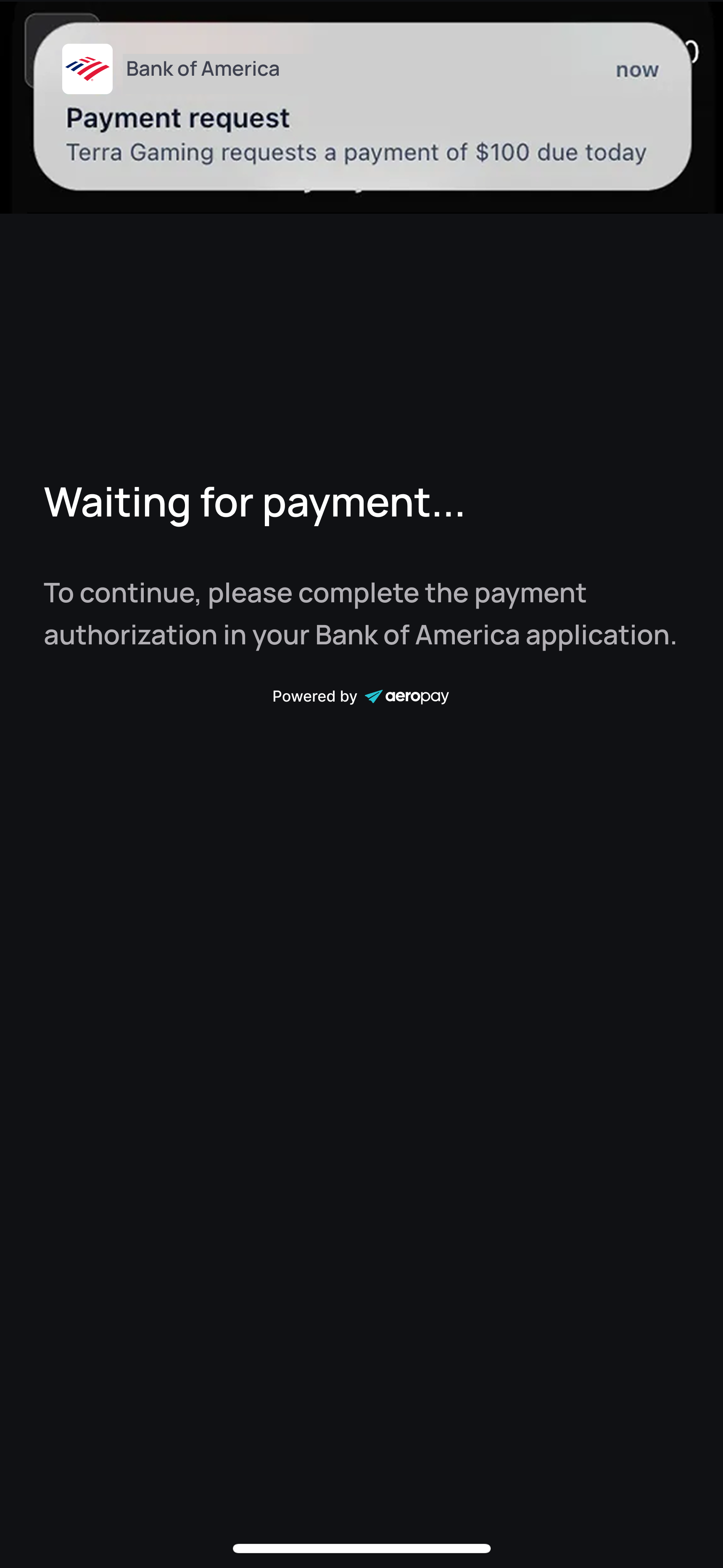
Because the RfP flow requires the user to authorize the payment in their banking app, it is important to ensure proper messaging and notifications to keep the user engaged throughout the journey.
Pending RfP CTA
In order to ensure the user takes action on a pending RfP transaction, once you receive the transaction_rfp_initiated webhook topic, your UI should display a call to action that the user needs to complete the payment authorization before proceeding. Your application should disallow other actions until the payment is authorized.
Below is an example of what your UI can display.
Re-engagement CTA
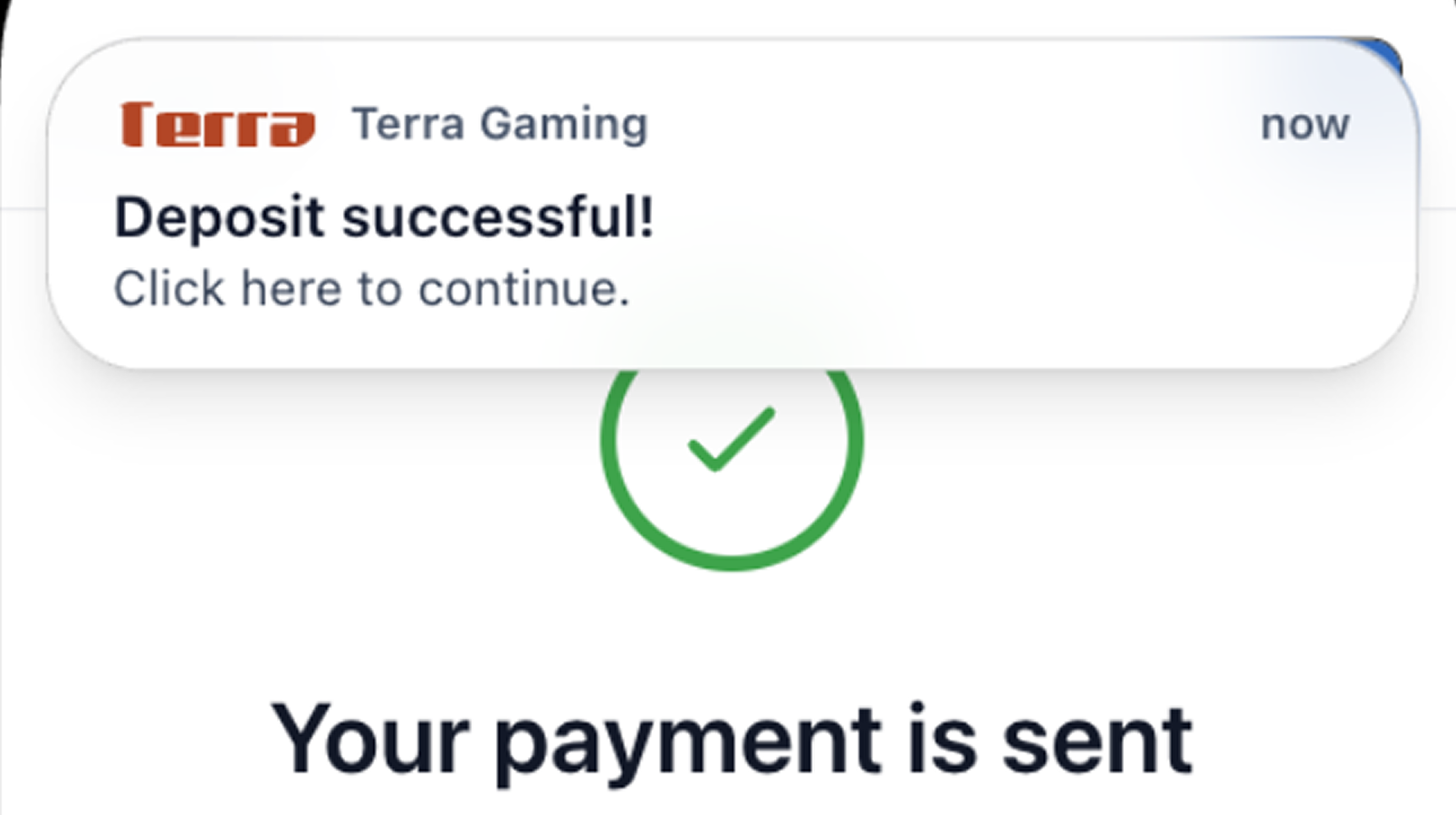
In order to re-engage the user after an RfP transaction has been completed, you should send a notification to the user upon receiving the transaction_completed webhook in order to prompt the user to come back to your application.
This notification can be in the form of native push notification, SMS, or email.
7. Best practices
-
Backend
- Include
rtpflag when creating transactions viaPOST /transactions. - Store and handle webhook events for transaction and payment lifecycles.
- Ensure idempotency for both transaction creation and webhook handling.
- Store user information during KYC process to ensure necessary PII can be passed via API without adding friction to UX.
- Include
-
Frontend / Product
- Clearly communicate when a payment is instant and irrevocable.
- Send push notifications based on webhook events to help users return to originating app.
-
Monitoring
- Track rates for:
- Eligibility (RFP available vs fallback to ACH).
- RFP delivery success.
- User approvals vs rejections vs expirations.
- RTP payout success vs failures.
- Track rates for:
Updated 16 days ago