

Step 2 - Create a User
Create a user to receive funds from
Aeropay users are individuals, uniquely identified by a phone number, who can link bank accounts and make transactions. If you are opting for white-labeled user creation in your application, you'll need to create a user before initiating a transaction.
Note that if the user you are creating already has an account with Aeropay, their existing account information will be returned.
Create a User workflow
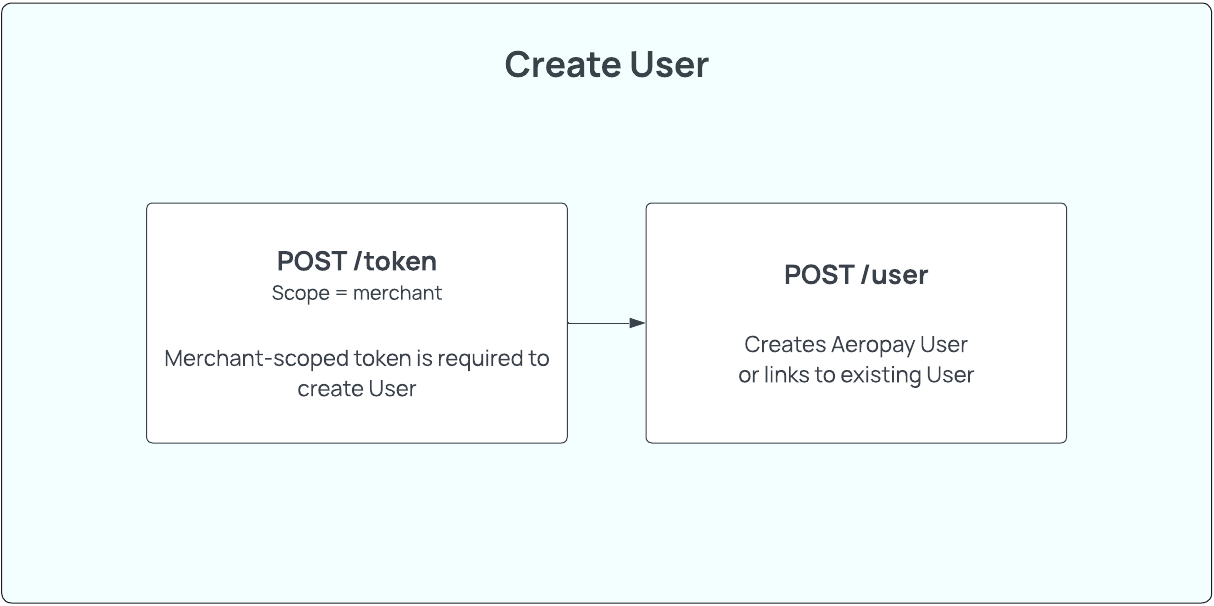
Step 2a - Create the User
HTTP request
Sandbox - POST https://api.sandbox-pay.aero.inc/user
Production - POST https://api.aeropay.com/user
Request parameters
| Parameter | Required? | Type | Description |
|---|---|---|---|
| first_name | Yes | String | The User's first name as shown on their government ID Min xx characters Max xx characters |
| last_name | Yes | String | The User's last name as shown on their government ID Min xx characters Max xx characters |
| phone_number | Yes | String | The User's phone number Must be in international format (+11234567890) Landline, VOIP, or prepaid phone numbers are invalid in production. |
| Yes | String | The User's email address Must be a valid email address |
Code Example - Request
curl --request POST \
     --url https://api.sandbox-pay.aero.inc/user \
     --header 'Content-Type: application/json' \
     --header 'X-API-Version: 1.1' \
     --header 'accept: application/json' \
     --header 'authorizationToken: Bearer {{token}}' \
     --data '
{
  "first_name": "Jane",
  "last_name": "Doe",
  "phone_number": "+11234567890",
  "email": "[email protected]"
}
Code Example - Response
Aeropay will respond with the full user object if the user is new to Aeropay.
{
    "user": {
        "userId": "1234",
        "firstName": "Jane",
        "lastName": "Doe",
        "type": "consumer",
        "email": "[email protected]",
        "phone": "+11234567890",
        "token": "None",
        "hasValidated": "None",
        "bankAccounts": [],
        "customerId": "None",
        "username": "84c825e2-01b5-4706-a315-fd8cdafee620",
        "receivesEmail": "0",
        "platform": "None",
        "profImgURL": "None",
        "createdDate": "1605113011"
    }
}
If the user already exists in Aeropay, but has never transacted at your merchant, POST /user will respond with the following message. See Step 2B for how to handle this scenario.
{
  "success": true,
  "error": null,
  "existingUser": {
    "userId": "123456",
    "phone": "+11234567890",
    "email": "[email protected]"
  },
  "displayMessage": "You've previously used AeroPay to pay another business. Please verify your identity by entering the pin sent to your email ja****[email protected]"
}
Error codes
| HTTP status | Error Code | Meaning | Resolution | Message |
|---|---|---|---|---|
| 200 | N/A | Missing phone_number parameter | Provide parameter 'phone_number' | Phone number required to create an AeroPay user |
| 200 | N/A | Phone number is being used by a current Aeropay user | Have user provide PIN in email and pass to our /confirmUser endpoint | You've previously used AeroPay to pay another business using this phone number. Please verify your identity by entering the pin sent to your email |
Step 2B - Confirm User Identity
In the case the user you've created already exists in the Aeropay ecosystem, you will relieve an error from POST /user that the user you created has previously used Aeropay. Aeropay will send an MFA code to the user's email registered with their pre-existing Aeropay account. This MFA code has a TTL of 15 minutes.
You will have to verify the user's identity with POST /confirmUser. The POST /confirmUser API can be used to verify the user's identity by requiring the user to enter an MFA code sent to the email on file with Aeropay. Note: Aeropay handles sending of these MFA codes.
Use our test endpoint to "unverify" any test users you've created to test this existing user flow in sandbox.
HTTP request
Sandbox - POST https://api.sandbox-pay.aero.inc/confirmUser
Production - POST https://api.aeropay.com/confirmUser
Request parameters
| Parameter | Required? | Type | Description |
|---|---|---|---|
| userId | Yes | String | The User's Aeropay userid |
| code | Yes | String | MFA code provided by user. |
Code Example - Request
curl --request POST \
     --url https://api.sandbox-pay.aero.inc/confirmUser \
     --header 'Content-Type: application/json' \
     --header 'accept: application/json' \
     --header 'authorizationToken: Bearer {{token}}' \
     --data '
{
  "userId": "123123", // userId of user
  "code": "234153", // MFA code provided by user via email
}
Code Example - Response
{
    "success": true,
  	"error": null
}
Step 2C - Retrieve the User Details
Aeropay recommends saving the userId and demographic information in your own database, but the user's actively-linked bank accounts must be fetched before making a transaction. The GET /user API can be used to fetch all relevant user information by searching on the user's Aeropay userid.
HTTP request
Sandbox - GET https://api.sandbox-pay.aero.inc/user
Production - GET https://api.aeropay.com/user
Request parameters
| Parameter | Required? | Type | Description |
|---|---|---|---|
| id | Yes | String | The User's Aeropay userid |
Code Example - Request
curl --request GET \
     --url https://api.sandbox-pay.aero.inc/user \
     --header 'Content-Type: application/json' \
     --header 'accept: application/json' \
     --header 'authorizationToken: Bearer {{user or userForMerchant token}}'
Code Example - Response
{
    "success": 1,
    "user": {
        "userId": "1234",
        "firstName": "John",
        "lastName": "Doe",
        "type": "consumer",
        "email": "[email protected]",
        "phone": "+13144949063",
        "createdDate": "1605113011",
        "bankAccounts": [
            {
                "bankAccountId": "123456",
                "userId": "1234",
                "bankName": "Chase Bank",
                "accountLast4": "1222",
                "name": "Checking - 1222",
                "externalBankAccountId": "",
                "isSelected": "1",
                "accountType": "checking",
                "status": "verified",
                "createdDate": "1692715066"
            }
        ],
      	"createdDate": "1716312178",
        "aeroPassUserUuid": "0f2542a4-8e60-4a72-b3a1-064f2d6943e8",
        "userStatus": "Active"
    }
}
Updated over 1 year ago